
You want Claude or ChatGPT to answer questions from your own database. The fast way is everywhere in the tutorials: stand up an MCP server, hand it a database connection with full access, point the model at it. It works on the first try, which is exactly why it is dangerous. You have just given a system that acts on natural language a direct line to all of your data.
The Model Context Protocol is a genuinely useful standard for connecting tools and data to language models. But an MCP server is an integration surface, and it deserves the same authorization discipline you would give any public API. Here is how to connect your data without handing over the keys.
Why the quick setup is a problem
The default tutorial gives the MCP server one powerful credential with broad access, and exposes a general “run this query” capability to the model. Now recall that a language model can be steered by the text it processes, including text from documents, tickets, or web pages it was asked to read. A model that can be convinced to run an arbitrary query, against a connection that can read and write everything, is a data breach waiting for the right input.
The problem is not MCP. The problem is granting broad, unscoped power because it was the shortest path to a working demo.
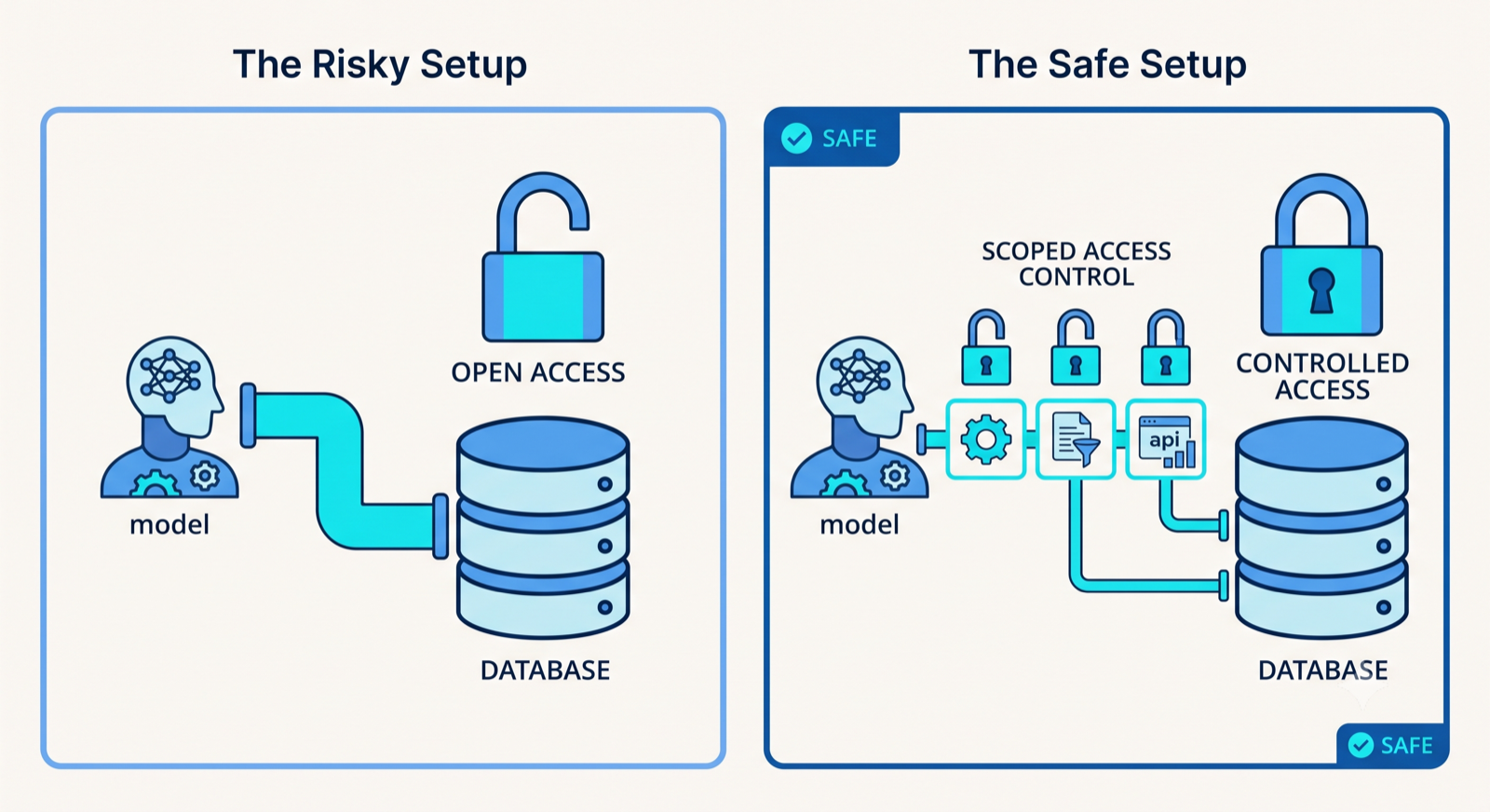
Scope credentials per tool, not one key for everything
Do not give the MCP server a single god credential. Give each capability the narrowest access it needs. A tool that looks up order status needs to read the orders table and nothing else. A tool that updates a support ticket needs to write to that one place. If a tool is ever abused, the damage is bounded by that tool’s scope, not by everything the database can do.
This is least privilege, applied to model tooling. The question for every tool is: if this exact capability were misused, what is the worst that happens? Keep narrowing until the answer is acceptable.
Separate reads from writes, and gate the writes
Reading data and changing data are different risk levels, so make them different tools. Expose read and write as separate capabilities, and put confirmation in front of anything that writes, deletes, or sends. A model can retrieve freely within its scope, but an action that changes your data or reaches a customer should pass through a human or a validated, constrained path first.
This separation means a poisoned instruction that reaches the model cannot quietly rewrite your records, because writing is not something the model can do on its own authority.
Never let the model write raw queries
The most important rule: do not expose a capability that runs model-generated database queries directly. Instead, offer specific, parameterized operations, “look up an order by ID,” “list a customer’s open tickets”, where the model supplies values into a query you wrote, not the query itself.
Parameterized operations are the same defense that protects any application from injection. The model chooses the inputs. It does not get to compose the command. That single boundary removes the entire class of “the model was talked into a destructive query” failures.
Carry the user’s identity through to the data
If several people use the assistant, the model must not become a way around your existing permissions. The identity of the person making the request should flow all the way to the data layer, so the same access rules that govern your app govern the model’s tools. User A asking the assistant should reach exactly what User A is allowed to see, and no more. Without this, a multi-tenant assistant becomes a way for one customer to read another’s data by simply asking.
Log every call
Record every tool invocation the model makes: which tool, which inputs, which user, what came back. When you need to answer “what did the assistant access, and on whose behalf,” the audit trail is the difference between a clear answer and a guess. It is also how you spot abuse while it is still small.
| timestamp | tool | user | params | result |
|---|---|---|---|---|
| 2026-08-09 14:22Z | get_order_status | alice@acme.co | order_id=1042 | ok |
| 2026-08-09 14:23Z | update_ticket | alice@acme.co | ticket=88, status=closed | ok (write, confirmed) |
| 2026-08-09 14:24Z | get_order_status | bob@acme.co | order_id=1042 | denied (not bob’s order) |
| 2026-08-09 14:25Z | run_sql | bob@acme.co | “DROP TABLE users” | blocked (tool not exposed) |
The one-line version
An MCP server is a door into your systems for something that acts on natural language and can be influenced by the text it reads. Treat it exactly like a public API: scoped credentials, reads separated from gated writes, parameterized operations instead of raw queries, per-user identity, and full audit logging. Do that, and you get the usefulness of connected data without the exposure.
Building custom MCP servers with real authorization, so internal tools and databases connect to models safely, is a defined part of what NukyLabs does. If you are wiring your data to an assistant, the boundary is worth getting right before it goes live.
Facing this in your own build?
NukyLabs helps founders take AI-generated apps, agents, and automations from a working demo to something that survives real users. If any of the above hit close to home, we can scope it with you.
Get a free consultation →or message us to talk through your project.