
Most agent tutorials stop at the point where the agent calls a function you defined in the same file. That is a useful demo and a bad architecture. The moment a tool needs a heavy dependency, a different language, or the ability to crash without taking your agent down, in-process function calling stops being the right shape.
Putting that tool behind a protocol fixes all three at once. Here is what it takes to build an MCP server in Google’s Agent Development Kit, what each piece does, and the parts worth getting right the first time.
Some context on the framework, since it is young enough that a lot of writing about it is guesswork. Google announced ADK at Cloud NEXT on 9 April 2025 and released it under Apache 2.0, so it is genuinely open source rather than a licensed SDK with a free tier. The Python package targets Python 3.10 and above, and while it is optimised for Gemini, the README describes it as model-agnostic and deployment-agnostic. You are not locked to one provider by adopting it.
Why move a tool out of process
Start with what you gain, because it is not obvious from a hello world example.
Isolation. The tool runs as its own process. If it segfaults inside a native dependency or leaks memory over a long run, your agent survives and reports a failed tool call instead of dying.
Language independence. The agent talks to the tool over a protocol, not an import. A scraper in Node, a numerical routine in Go, and a legacy Python 3.9 script with pinned dependencies can all serve the same agent without a shared virtualenv.
Runtime discovery. The agent asks the server what it offers and gets back names, argument schemas, and descriptions. You can add or version a tool without touching agent code.
Reuse. Any MCP-compatible client can use the same server. The tool stops being part of one agent and becomes infrastructure.
The cost is a process boundary: serialization, a handshake, and one more thing to supervise. For a tool that wraps a fast local function with no dependencies, that trade is not worth it. For anything that touches the network, holds significant state, or belongs to another team, it usually is.
Consuming an MCP server from an ADK agent
This is the common direction and the simpler one. ADK ships a toolset class that handles the whole lifecycle.
Worth knowing before you copy a snippet off the internet: ADK exists in five languages, Python, TypeScript, Go, Java and Kotlin, and the MCP class is not named identically across them. Python and Java use McpToolset. TypeScript uses MCPToolset, all capitals. That single letter accounts for a surprising share of the “the docs are wrong” issues people file.
In Python the class is McpToolset. You give it connection parameters, and for a local server that means StdioConnectionParams wrapping StdioServerParameters, which carries the command and arguments used to launch the server process. For a remote server there is StreamableHTTPConnectionParams instead.
Once that toolset is in an agent’s tools list, ADK queries the server through the MCP list_tools method, converts each discovered schema into an ADK BaseTool, and from the agent’s perspective they behave like any other tool. When the model picks one, the toolset proxies the call through call_tool and returns the result.
One parameter is worth knowing on day one: tool_filter. It takes a list of tool names and exposes only those. Given the point about tool list bloat, pointing an agent at a large third party server and importing forty tools you do not need is the fastest way to make selection unreliable. Filter to the ones the agent should actually reach for.
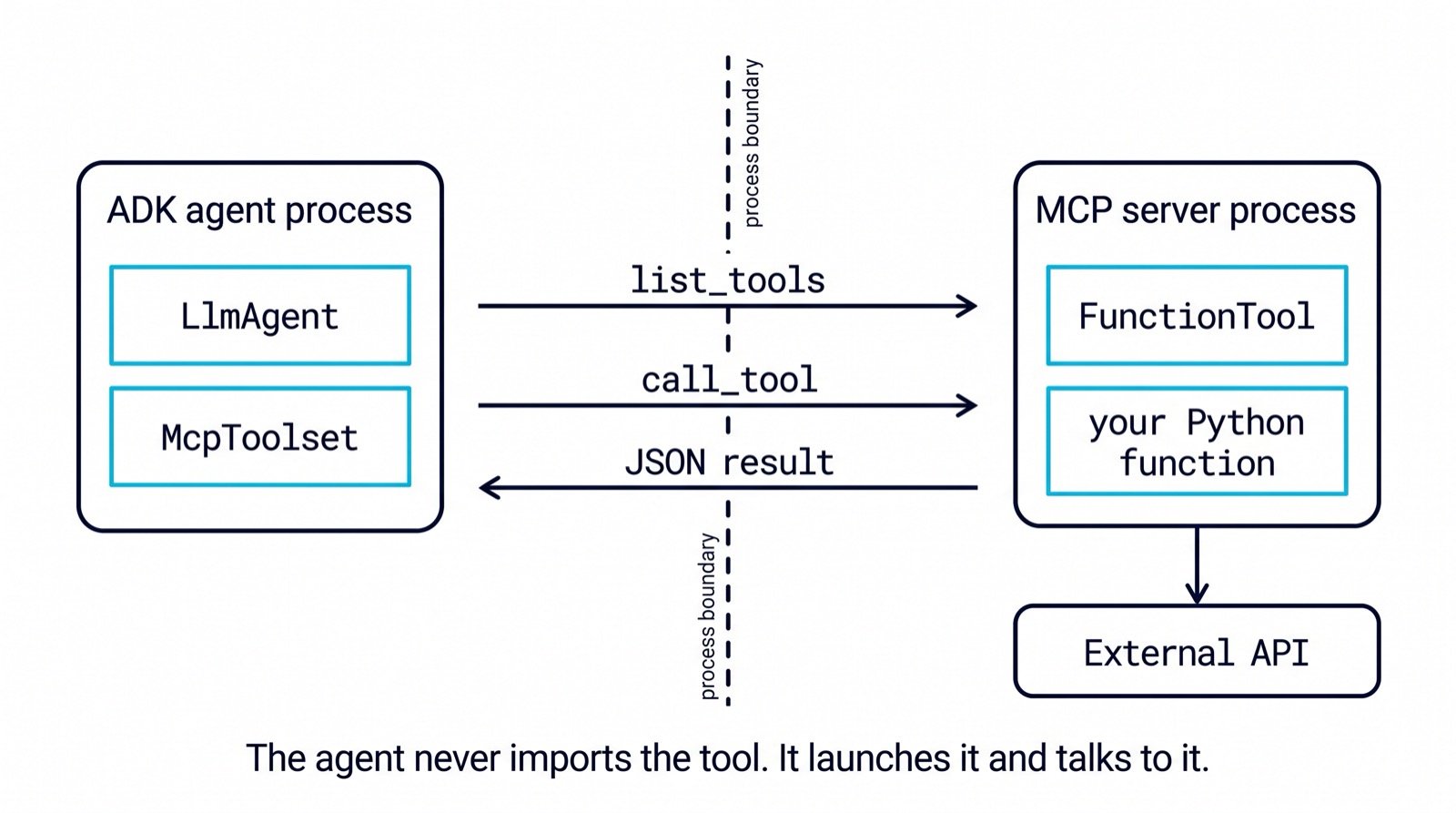
Build an MCP server for your own tool
The other direction, exposing a function you wrote so any MCP client can call it, is where the interesting design decisions live.
The flow has four parts. First, wrap your plain Python function in ADK’s FunctionTool. This is the step that earns its keep: ADK inspects the function’s signature, type hints, default values, and docstring, including the parameter descriptions in its Args section, and builds the schema from them. You do not hand write JSON Schema, which means the schema cannot drift from the function.
Second, convert that ADK tool into the shape MCP expects, using adk_to_mcp_tool_type from google.adk.tools.mcp_tool.conversion_utils.
Third, implement two handlers using the mcp library directly, not ADK. One answers the discovery call by returning your converted tool definitions. The other receives a tool name plus a dictionary of arguments, checks the name, runs the function, and returns the result as mcp.types.TextContent.
Fourth, attach the server to stdio and run it. The client launches your script as a subprocess and speaks the protocol over standard input and output.
Two things to get right here. Because stdout carries the protocol, anything else your code prints there will corrupt the stream: send logs and diagnostics to stderr, always. And return errors as structured JSON your agent can reason about rather than letting exceptions escape, since a model handles “this query returned no rows” very differently from a stack trace.
Writing tools a model can actually use
The mechanics above are the easy half. The half that decides whether your agent works is the docstring, because the docstring is the entire description the model uses to choose.
Treat it as interface copy, not developer notes. Say what the tool is for and when to reach for it, not how it is implemented. Name the arguments so their meaning is unambiguous without reading the body. If a parameter has a constrained set of valid values, list them in the description, because the model has no other way to know.
Keep the return shape flat and predictable. Deeply nested JSON is fine for code and expensive for a model, both in tokens and in the number of chances it has to misread a field. If your function returns a large result set, return a summary and a way to fetch more rather than dumping everything into context.
The same reasoning applies to how many tools you expose. A server offering three well described tools will outperform one offering fifteen that overlap, for exactly the reason the schema is auto-generated in the first place: the description is the interface.
Where this stops being worth it
If your tool is a pure function with no dependencies and one consumer, keep it in process. FunctionTool on its own gives you the schema generation without the process boundary, and you can always move it out later. The conversion utility exists precisely so that promoting an in-process tool to an MCP server is not a rewrite.
Be honest about operations too. Every stdio MCP server is a subprocess your deployment has to launch, supervise, and shut down cleanly, and a crash loop in a tool server is a new class of incident. On a single machine that is trivial. Across a fleet it needs the same care as any other service, and that is usually the point at which teams call us, having discovered that the demo and the deployment are different problems.
Facing this in your own build?
NukyLabs helps founders take AI-generated apps, agents, and automations from a working demo to something that survives real users. If any of the above hit close to home, we can scope it with you.
Get a free consultation →or message us to talk through your project.